0
  • JUNG Visu Pro in front of a dark background with colour gradient.

JUNG Visu Pro – the solution for the smart building

The JUNG Visu Pro Server with pre-installed Visu Pro software is ideal for applications in demanding smart buildings. Connected with the KNX installation and the local network, it makes comprehensive individual adaptations of the complete system possible.

Server specification

With its compact design, the Visu Pro Server is conceived for mounting on a DIN rail (included adapter required). However, you can also use it as a desktop device. It is completely silent in use without any active fans as the cooling is passive. The power consumption even under full load is minimal (12 W in operation, maximum 6 W on standby). The built-in processors and memory enable a smooth operation, even with more demanding applications.
Connections
arrow-left-slim
  • USB 3.0
    USB 3.0
  • DHCP
    DHCP
  • Fixed IP address
    Fixed IP address
  • HDMI connection
    HDMI connection
  • 12 VDC
    12 VDC
arrow-right-slim

JUNG Visu Pro software

From the planner version for pre-planning to the full version for hotels: JUNG offers the right Visu Pro software for a given case for all applications, even without hardware. As soon as the project in the home area becomes more comprehensive and even more individual, the JUNG Visu Pro Server is suitable.
Planner version
With this version, system integrators can completely configure and parameterise every customer system in advance – independently of the hardware required later.
Full version
For particularly complex KNX systems, on the one hand integrators turn to the full version of JUNG Visu Pro. On the other hand, they need a tailored hardware solution to implement the individual KNX building system.
Full version for hotels
Optimised processes at reception make satisfied guests: the JUNG Visu Pro software takes information from the hotel software from when to when a room is booked and automatically activates the appropriate guest profiles.

Secure, convenient and sustainable

KNX Secure logo, a building in the background.
Data security with KNX Secure
Your data are doubly secure: KNX Data Secure encrypts the KNX telegrams in the KNX bus, KNX IP Secure secures the exchange over the IP network.

Connection to the Internet of Things
“Alexa, switch on the light”.
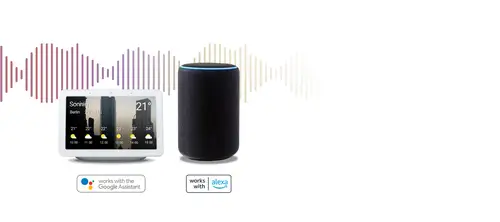
"Set the temperature in the meeting room to 21 degrees". The JUNG Visu Pro Server is compatible with the Alexa and Google Assistant voice services. The relevant skill or action is available for free from Amazon and Google. And then you have free control using speech. Give the smart building control centre your commands by announcement. 
SmartThings
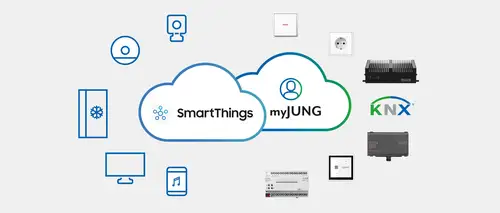
As one of the first manufacturers, we combine KNX building automation technology with the IoT world of SmartThings. Users profit from greater convenience and save energy costs. You can now network your entire KNX building automation technology with SmartThings-compatible devices and control them using the SmartThings app.
Update 4.11.0.3 | Direct MQTT connection
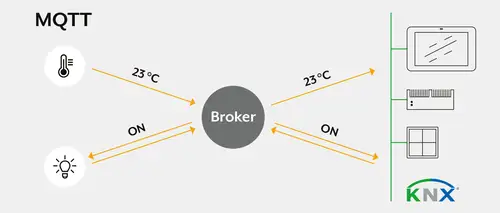
The update extends the connection of networked building technology. The MQTT connection enables the direct integration and control of MQTT-capable devices from different manufacturers. This means more flexibility in project design and extended options for the visualisation of complex applications.
New functions:
  • New MQTT option in the process model for polling and controlling MQTT-compatible products
  • Extended options for the JVP button
  • Hiding Visu elements via data points
  • General improvements to the Modbus editor

The update is available for download and can be installed on the desired PC.
Update V 4.10 | Implementation of HTML calendar and Modbus TCP

With the update, it is possible to set up an HTML annual calendar that executes scenes depending on the start or end of the calendar event. The Modbus process connection can use existing device databases for configuration.
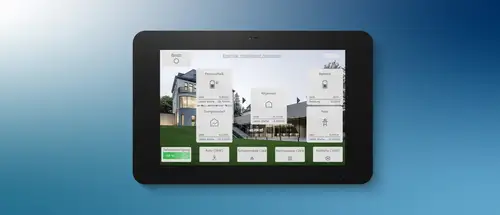
Smart Panel 8 with the visualisation interface after the JVP update 4.10
Task of an HTML calendar in a KNX installation
An HTML calendar enables the time-controlled and automated control of functions in a KNX installation (e.g. lighting, blinds, heating). It can be conveniently configured via a web interface and can trigger recurring and one-off events - even taking public holidays and special events into account.

Private use:
1. control of a switched socket in recurring time periods
  • The HTML calendar automatically switches the socket for the Christmas tree or pool pump on and off according to a defined schedule - without the need for a manual timer switch. → Increase convenience, reduce standby loads
2. public holidays override the weekly timer
  • The shutters stay down on public holidays, even if they would otherwise go up early on working days. → Gain in comfort
3. different heating profiles for "home office" and "company"
  • During a "home office" appointment, the office is heated; during a "company" appointment, the heating in the office remains off. → Energy savings, increased comfort
4. presence simulation through "holiday - travel"
  • During a trip, the control system simulates presence by randomly moving the blinds and switching the lighting. - A simple "holiday" appointment only prevents the shutters on the ground floor from being raised in the morning. → Energy savings, increased comfort
5. integration of the local waste calendar
  • The HTML calendar displays the collection dates for waste bins on a Smart Panel. → Added convenience

Commercial use:
1. switching of power strips and TV only when the room is occupied
  • Sockets and devices (e.g. televisions) are only switched on when a meeting room is actually booked. → Reduce standby consumption, energy efficiency
2. air conditioning only when the room is occupied
  • The heating or air conditioning is only activated when the room is actually in use. → Energy efficiency
3. control of outdoor lighting over the course of a year
  • The outdoor lighting is automatically switched according to a yearly schedule - public holidays and company closures are taken into account. → Energy efficiency
4. prioritisation for overlapping events
  • Air conditioning is suspended on public holidays, even if a regular weekly programme is active. → Flexibility, energy efficiency
5. additional lighting in gyms on match days
  • The lighting is fully enabled on match days, but reduced to standard lighting during normal school operation. → Energy saving, increased comfort
6. switching off the kitchenette and coffee machine after working hours
  • Devices in the kitchenette are automatically switched off after working hours, for example to prevent hobs from being accidentally left on. → Energy saving
7. switch on ambient lighting after opening hours
  • Ambient lighting is activated after closing time to create an attractive appearance. → Added convenience, energy efficiency
Modbus in the Visu Pro Server (JVP)
The Visu Pro Server (JVP) now supports the Modbus TCP protocol. Via Modbus TCP, the JVP:
  • Read values from Modbus devices (e.g. electricity meters, inverters, heat pumps)
  • Write values to Modbus devices (e.g. change the operating mode of air conditioning systems)
  • Integrate Modbus data points into the KNX installation and indicate them in the visualisation

Does the device only support serial communication via Modbus "RTU"?

If a participant communicates on the basis of Modbus RTU (via RS485), a Modbus RTU to TCP converter is required.


Solutions:

1. manufacturer-specific converter

  • Some manufacturers offer their own RTU to TCP converters that are optimised for their devices.
2. general Modbus RTU to TCP converter
A general RTU-TCP converter can be used - however, the following parameters must be observed:
  • Baud rate → Communication speed (e.g. 9600, 19200, 38400 baud)
  • Parity → None, even or odd
  • Stop bits → 1 or 2
  • Data format → e.g. 8N1 (8 data bits, no parity, 1 stop bit)
  • Multiple devices on one Modbus RTU converter - If multiple Modbus RTU devices are connected to one converter, each device must have a unique Modbus ID and all Modbus RTU properties, such as baud rate or parity, must match


Where can I find these Modbus properties and registers?

In order to read or write the correct values from a Modbus device, precise information from the manufacturer is usually required.


The manufacturer usually provides a Modbus document (register list or data point list) containing the following information:

  • Register ID → Which ID can be used to read or write which information
  • Data type → What type the data is (e.g. integer, float)
  • Access right → Whether the data point can only be read (Read) or also written (Write)
  • Addressing → Whether the start digit of the register begins at 0 or 1
  • Data sequence → Whether the data is transferred in big endian (from front to back) or little endian (from back to front) format

Thanks to the constantly growing JUNG Modbus database, the search for standard manufacturer information is no longer necessary. This database is installed locally in every JUNG Visu Pro update. Missing manufacturers can be reported to JUNG under JUNG Modbus Github.

Use cases for Modbus in a KNX installation
heat pump
Control of the setpoint temperature (heating circuit):
  • The desired flow temperature for the heating circuit is set directly via Modbus TCP.
  • Adjustment takes place automatically depending on the outside temperature and schedule.
Control of the setpoint temperature (hot water):
  • The hot water temperature can be set directly via the Modbus data point (e.g. 45 °C).
  • Different temperature profiles (e.g. comfort mode vs. eco) can be stored.
Readout of flow and return temperature:
  • The current flow and return temperatures are read out as float values.
  • Deviations between flow and return can be used to analyse efficiency.
Readout of volume flow, pressure and energy values:
  • Recorded operating values (e.g. flow rate in l/min, pressure in bar) are transmitted via Modbus.
  • The values can be used to analyse and optimise the system.
Control of forced and normal operation:
  • Switching between normal and forced operation via Modbus command.
  • Z. E.g. automatic start-up at high PV power.
Reading out error statuses:
  • Error codes and status messages from the heat pump are read out directly via Modbus.
  • An error message can be forwarded.
Wallbox
Reading out the charging status (reserved, charging, ready, error):
  • Polling of the current status directly via Modbus (e.g. "charging", "ready", "error").
  • Status indication via visualisation or LED display.
Start and end of the charging cycle:
  • Start and end of charging are registered via Modbus.
  • Start/stop can also be triggered specifically via KNX or app.
Allocation of all data on the basis of stored access tags:
  • Readout of the user ID (RFID tag) and assignment of the charging data to a user.
  • Charging capacity can be billed per user.
Readout of the charging capacity (kW):
  • Indication of the current charging capacity in real time (e.g. 11 kW).
  • Deviations or errors can be recognised.
Limiting the charging capacity (kW):
  • Limitation of charging capacity via Modbus command (e.g. to 6 kW due to grid load).
  • Dynamic adjustment according to load management specification.
Reading out the power consumed (kWh):
  • The amount of energy actually charged is logged as a kWh value.
  • These values can be used for billing and analysis.
Inverter
Readout of power data (e.g. photovoltaic system):
The current feed-in power (in kW) is transmitted as a float value via Modbus.
The values can be used for dynamic load management.
Readout of current, frequency and voltage:
Phase-by-phase recording of current (in A), frequency (in Hz) and voltage (in V).
Deviations or grid instabilities are recognised.

Battery storage
Charging/discharging the battery via current specification:
  • The charging or discharging power can be specified via Modbus in per cent or watts, e.g.: Charge the battery with 2 kW or up to 80 %.
Charging/discharging the battery via power specification:
  • The charging capacity can be dynamically adapted to the current PV power, e.g.: Charge the battery with surplus power from the PV system.
Range specification of a min./max. SoC (State of Charge) in per cent:
  • The battery's state of charge can be limited to a range (e.g. 20 % to 80 %).
  • Prevents deep discharge or overcharging.
energy meter
Readout of power data:
  • Current power (in kW) is transmitted continuously via Modbus.
  • Can be displayed in the dashboard or used for load management.
Readout of current, frequency and voltage:
  • Phase-by-phase recording of current (in A), frequency (in Hz) and voltage (in V).
  • Deviations or grid problems are recognised immediately.
Reading out the power factor:
  • Ratio of active and reactive power is output as a power factor.
  • A low power factor (e.g. below 0.9) indicates poor mains quality or a large number of ballasts in the electric circuit.

Quick start guides

Set up functions and use directly: the Quick Start Guides use short and clear step-by-step instructions to show how you can exhaust the versatile possibilities of the JUNG Visu Pro Server.
Integrate ALEXA and Google Home voice control
With the help of the JUNG Visu Pro servers and the MyJUNG Voice Service, the Amazon Alexa and Google Home smart speakers can be simply integrated into the KNX installation.
Correctly set the system time
With JUNG VISU PRO you control your system reliably and conveniently, irrespective of whether in the private or commercial sector.
Set up JVP Remote remote access
With the remote access for Jung Visu Pro, you can visualise, control and adapt your KNX installation to your requirements at any time and from any location.

Discover the Live Services from JUNG

JUNG GRAPHIC TOOL
Create individually switches, sockets, KNX buttons, room controllers and more according to your ideas. The operating elements can be customised online with symbols, text or logos.
JUNG Showrooms
You have the opportunity of experiencing our products and building technology in showrooms & brand stores.

JUNG Newsletter

Product news, architecture references and smart home trends: With our JUNG newsletters you are always well informed when it comes to trends and news.

Contacts

Do you have any questions, requests, or suggestions about our products and solutions? Please contact us. We hope we can help you!