JUNG „Visu Pro“ – sprendimas išmaniesiems pastatams
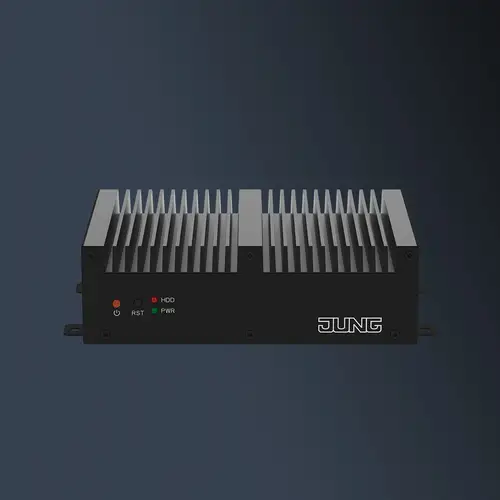
JUNG „Visu Pro Server“ su iš anksto įdiegta „Visu Pro“ programine įranga idealiai tinka naudoti sudėtinguose išmaniuosiuose pastatuose. Sujungtas su KNX sistema ir vietiniu tinklu, jis leidžia visapusiškai individualiai pritaikyti visą sistemą.
Serverio specifikacijos
Kompaktiškos konstrukcijos „Visu Pro Server“ yra suprojektuotas montuoti ant DIN bėgelio (reikalingas adapteris). Tačiau jį taip pat galima naudoti kaip stalinį prietaisą. Įrenginys veikia visiškai tyliai, nes jame dėl pasyvaus aušinimo nėra aktyvaus ventiliatoriaus. Energijos suvartojimas net ir esant pilnutinei apkrovai yra minimalus (12 W įrenginiui veikiant, ne daugiau kaip 6 W budėjimo režimu). Integruoti procesoriai ir atmintis užtikrina sklandų valdymą net ir naudojant sudėtingesnes programas.
Jungtys
-
![USB 3.0]() USB 3.0
USB 3.0 -
![DHCP]() DHCP
DHCP -
![Fiksuotas IP adresas]() Fiksuotas IP adresas
Fiksuotas IP adresas -
![HDMI jungtis]() HDMI jungtis
HDMI jungtis -
![12 VDC]() 12 VDC
12 VDC


„JUNG Visu Pro“ programinė įranga
Nuo pirminiam projektavimui skirtos versijos iki viešbučių sektoriui skirtos išsamios versijos: JUNG siūlo tinkamą „Visu Pro“ programinę įrangą visoms reikmėms, net ir be techninės įrangos. Kai tik projektas namų erdvėje tampa didesnis ir individualesnis, tuomet yra naudojamas JUNG „Visu Pro Server“.


Saugu, patogu ir tvaru

Duomenų saugumas naudojant „KNX Secure“
Jūsų duomenys yra dvigubai saugesni: „KNX Data Secure“ šifruoja KNX telegramas KNX magistralėje, o „KNX IP Secure“ apsaugo keitimąsi duomenimis IP tinkle.
Prisijungimas prie daiktų interneto
Update 4.11.1.4 | New categories for push notifications
Version 4.11.1.4 expands the visualisation functionality of the Visu Pro Server with new push notifications for mobile devices with iOS or Android.
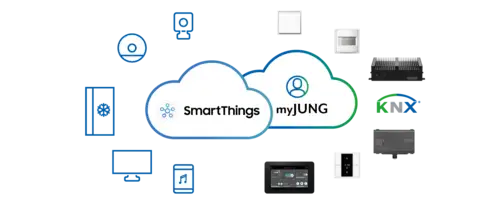
The new push categories provide users with only the information that is currently relevant to them – individually configurable for each device. (JUNG Smart Controls SC5 and SC8 are not suitable for push notifications due to restrictions related to Google Services.) Push notifications in the categories Alarm, Warning and Info report safety-relevant events such as movement, smoke or water leakage, support everyday use with status messages and calendar reminders, and provide information on energy, climate and system status – for example in the case of increased consumption or low battery levels. A prerequisite for implementation is myJUNG remote access including an assigned JVP-L licence.
In addition, the new server version resolves stability issues with the connection to myJUNG Remote. The update is now available for download.
Update 4.11.1 | New categories for push notifications
Version 4.11.1 expands the visualisation functionality of the Visu Pro Server with new push notifications for mobile devices with iOS or Android.
The new push categories provide users with only the information that is currently relevant to them – individually configurable for each device. (JUNG Smart Controls SC5 and SC8 are not suitable for push notifications due to restrictions related to Google Services.) Push notifications in the categories Alarm, Warning and Info report safety-relevant events such as movement, smoke or water leakage, support everyday use with status messages and calendar reminders, and provide information on energy, climate and system status – for example in the case of increased consumption or low battery levels. A prerequisite for implementation is myJUNG remote access including an assigned JVP-L licence.
The update is now available for download.
Atnaujinimas 4.11.0.3 | Tiesioginis MQTT ryšys
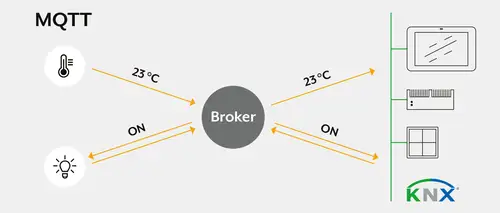
Šis atnaujinimas išplečia į tinklą sujungtos pastatų automatizuoto valdymo sistemos ryšio galimybes. MQTT ryšys leidžia tiesiogiai integruoti ir valdyti įvairių gamintojų įrenginius, palaikančius MQTT protokolą. Tai suteikia daugiau lankstumo projektuojant ir išplečia sudėtingų sistemų vizualizavimo galimybes.
Naujos funkcijos:
- Nauja MQTT parinktis proceso modelyje, skirta MQTT suderinamų produktų būsenos tikrinimui ir valdymui
- Išplėstos JVP mygtuko parinktys
- Galimybė paslėpti „Visu“ elementus naudojant duomenų taškus
- Bendri „Modbus“ redaktoriaus patobulinima
Atnaujinimas V 4.10 | HTML kalendoriaus ir „Modbus TCP“ įdiegimas
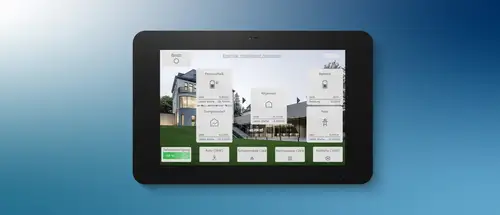
Po atnaujinimo galima sukonfigūruoti metinį HTML kalendorių, kuris aktyvuoja scenarijus priklausomai nuo kalendoriuje nustatytos įvykio pradžios ar pabaigos. „Modbus“ proceso jungtis konfigūruojant gali naudoti esamas įrenginių duomenų bazes.
Task of an HTML calendar in a KNX installation
An HTML calendar enables the time-controlled and automated control of functions in a KNX installation (e.g. lighting, blinds, heating). It can be conveniently configured via a web interface and can trigger recurring and one-off events - even taking public holidays and special events into account.
Private use:
1. control of a switched socket in recurring time periods
- The HTML calendar automatically switches the socket for the Christmas tree or pool pump on and off according to a defined schedule - without the need for a manual timer switch. → Increase convenience, reduce standby loads
2. public holidays override the weekly timer
- The shutters stay down on public holidays, even if they would otherwise go up early on working days. → Gain in comfort
3. different heating profiles for "home office" and "company"
- During a "home office" appointment, the office is heated; during a "company" appointment, the heating in the office remains off. → Energy savings, increased comfort
4. presence simulation through "holiday - travel"
- During a trip, the control system simulates presence by randomly moving the blinds and switching the lighting. - A simple "holiday" appointment only prevents the shutters on the ground floor from being raised in the morning. → Energy savings, increased comfort
5. integration of the local waste calendar
- The HTML calendar displays the collection dates for waste bins on a Smart Panel. → Added convenience
Commercial use:
1. switching of power strips and TV only when the room is occupied
- Sockets and devices (e.g. televisions) are only switched on when a meeting room is actually booked. → Reduce standby consumption, energy efficiency
2. air conditioning only when the room is occupied
- The heating or air conditioning is only activated when the room is actually in use. → Energy efficiency
3. control of outdoor lighting over the course of a year
- The outdoor lighting is automatically switched according to a yearly schedule - public holidays and company closures are taken into account. → Energy efficiency
4. prioritisation for overlapping events
- Air conditioning is suspended on public holidays, even if a regular weekly programme is active. → Flexibility, energy efficiency
5. additional lighting in gyms on match days
- The lighting is fully enabled on match days, but reduced to standard lighting during normal school operation. → Energy saving, increased comfort
6. switching off the kitchenette and coffee machine after working hours
- Devices in the kitchenette are automatically switched off after working hours, for example to prevent hobs from being accidentally left on. → Energy saving
7. switch on ambient lighting after opening hours
- Ambient lighting is activated after closing time to create an attractive appearance. → Added convenience, energy efficiency
Modbus in the Visu Pro Server (JVP)
The Visu Pro Server (JVP) now supports the Modbus TCP protocol. Via Modbus TCP, the JVP:
- Read values from Modbus devices (e.g. electricity meters, inverters, heat pumps)
- Write values to Modbus devices (e.g. change the operating mode of air conditioning systems)
- Integrate Modbus data points into the KNX installation and indicate them in the visualisation
Does the device only support serial communication via Modbus "RTU"?
If a participant communicates on the basis of Modbus RTU (via RS485), a Modbus RTU to TCP converter is required.
Solutions:
1. manufacturer-specific converter
- Some manufacturers offer their own RTU to TCP converters that are optimised for their devices.
2. general Modbus RTU to TCP converter
A general RTU-TCP converter can be used - however, the following parameters must be observed:
- Baud rate → Communication speed (e.g. 9600, 19200, 38400 baud)
- Parity → None, even or odd
- Stop bits → 1 or 2
- Data format → e.g. 8N1 (8 data bits, no parity, 1 stop bit)
- Multiple devices on one Modbus RTU converter - If multiple Modbus RTU devices are connected to one converter, each device must have a unique Modbus ID and all Modbus RTU properties, such as baud rate or parity, must match
Where can I find these Modbus properties and registers?
In order to read or write the correct values from a Modbus device, precise information from the manufacturer is usually required.
The manufacturer usually provides a Modbus document (register list or data point list) containing the following information:
- Register ID → Which ID can be used to read or write which information
- Data type → What type the data is (e.g. integer, float)
- Access right → Whether the data point can only be read (Read) or also written (Write)
- Addressing → Whether the start digit of the register begins at 0 or 1
- Data sequence → Whether the data is transferred in big endian (from front to back) or little endian (from back to front) format
Thanks to the constantly growing JUNG Modbus database, the search for standard manufacturer information is no longer necessary. This database is installed locally in every JUNG Visu Pro update. Missing manufacturers can be reported to JUNG under JUNG Modbus Github.
Use cases for Modbus in a KNX installation
Trumposios paleidimo instrukcijos
Funkcijų nustatymas ir jų naudojimas iš karto: šiose trumposiose paleidimo instrukcijose pateikiami trumpi ir suprantami nurodymai, nuosekliai paaiškinant, kaip visapusiškai išnaudoti įvairias JUNG „Visu Pro Server“ galimybes.