0
JUNG HOME Logo

JUNG HOME. JUST SMART.

In addition to the convenience brought to you in a smart home, would you like to enjoy greater security in your home's network and utilise energy more efficiently to reduce costs? This is all made possible with JUNG HOME, and best of all - you don't need to be an expert on smart home technology to set it up. 
The digitalisation of a building or apartment can be as easy as installing sockets and switches as long as you have the right technology. Unlock your home's potential and enjoy the benefits of having an intelligently networked electric installation. 
  • Two builders look into the camera with a smile.
    Make your home smart
    Digitalising a home can be as quick as getting a socket installed.
  • Two builders have the advantages of the smart JUNG HOME app explained to them.
    At the heart: the JUNG HOME app
    Commissioning, operation, updates, service - everything with just one app. 
  • Setting up the smart JUNG HOME system via the JUNG HOME app.
    Setting up JUNG HOME
    Simple and quick. You don't have to be an expert to set up and use this technology.
  • Two builders discuss the smart JUNG HOME products.
    Intelligent technology, stylishly designed
    Smart home technology that not only looks good, but feels good. 

JUNG HOME – the digital infrastructure for your home.

With JUNG HOME, we have developed a simple system with which you can smartify your home. It is based on the conventional 230-volt installation and does not require thorough renovation for wiring, allowing your building to fulfil the requirements for a digital infrastructure.

JUNG HOME at a glance

Light, shade, temperature: at its core, JUNG HOME consists of system inserts, covers and sockets that are locally networked using Bluetooth® SIG mesh to control these parameters.
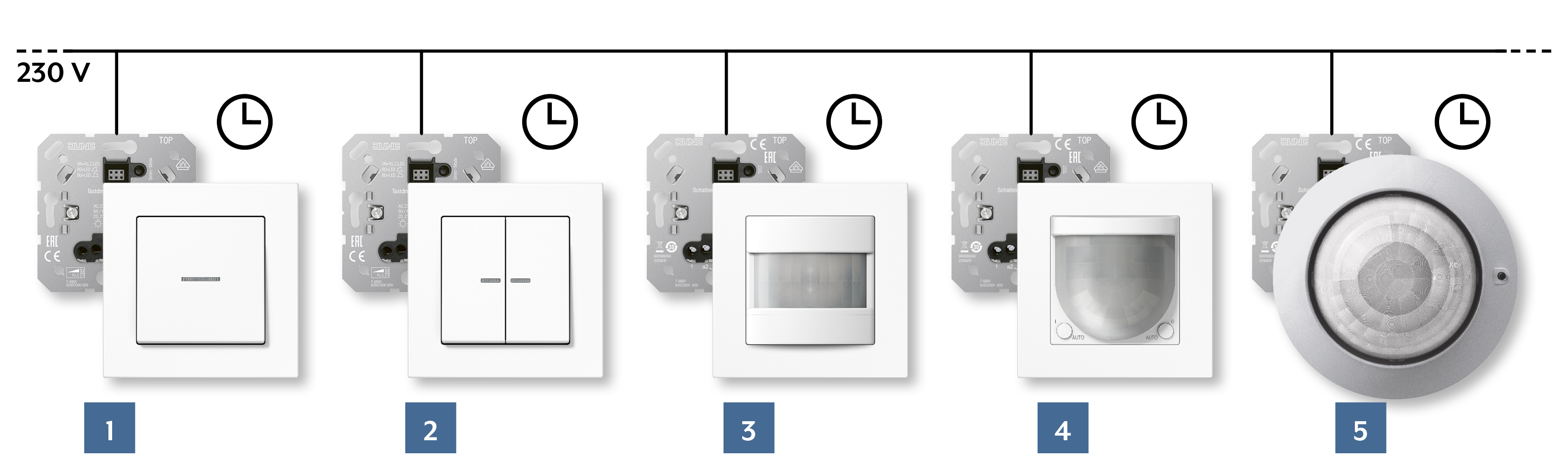
Controlling and dimming lights, switching electrical loads
  1. 1-gang push-button
  2. 2-gang push-button
  3. Motion detector 1.10 m
  4. Motion detector 2.20 m
  5. Presence detector
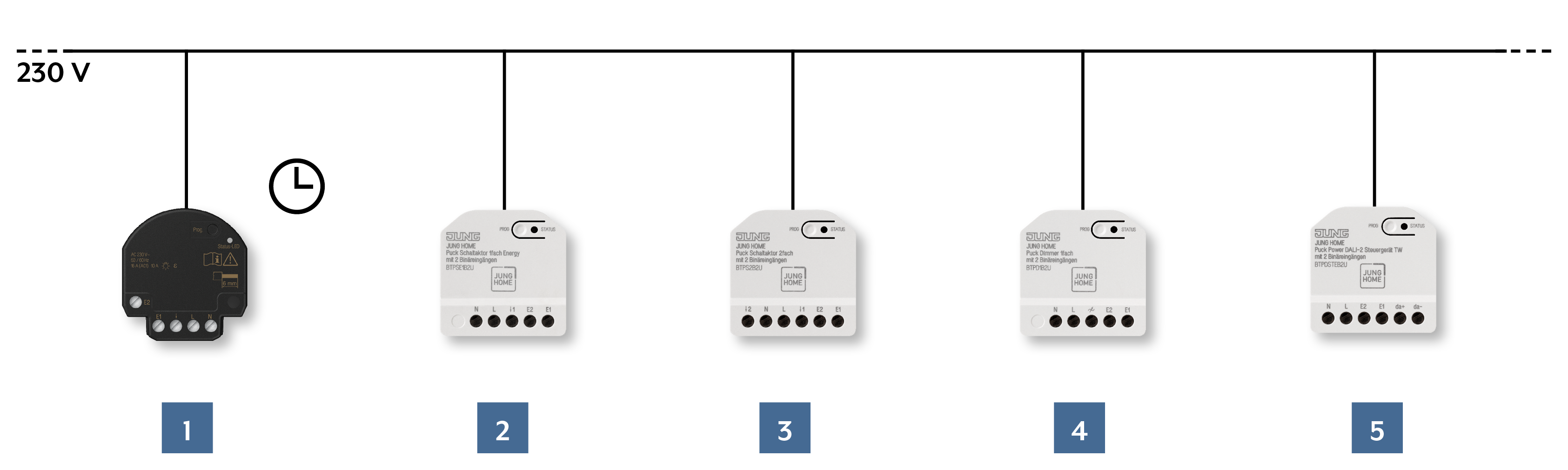
Light control and dimming, switching electrical loads with flush-mounted actuators
  1. Switch actuator mini 1-gang with 2 binary inputs
  2. 1-gang Energy switch actuator with 2 binary inputs
  3. 2-gang switch actuator with 2 binary inputs
  4. 1-gang dimmer with 2 binary inputs
  5. Power DALI-2 control device TW with 2 binary inputs
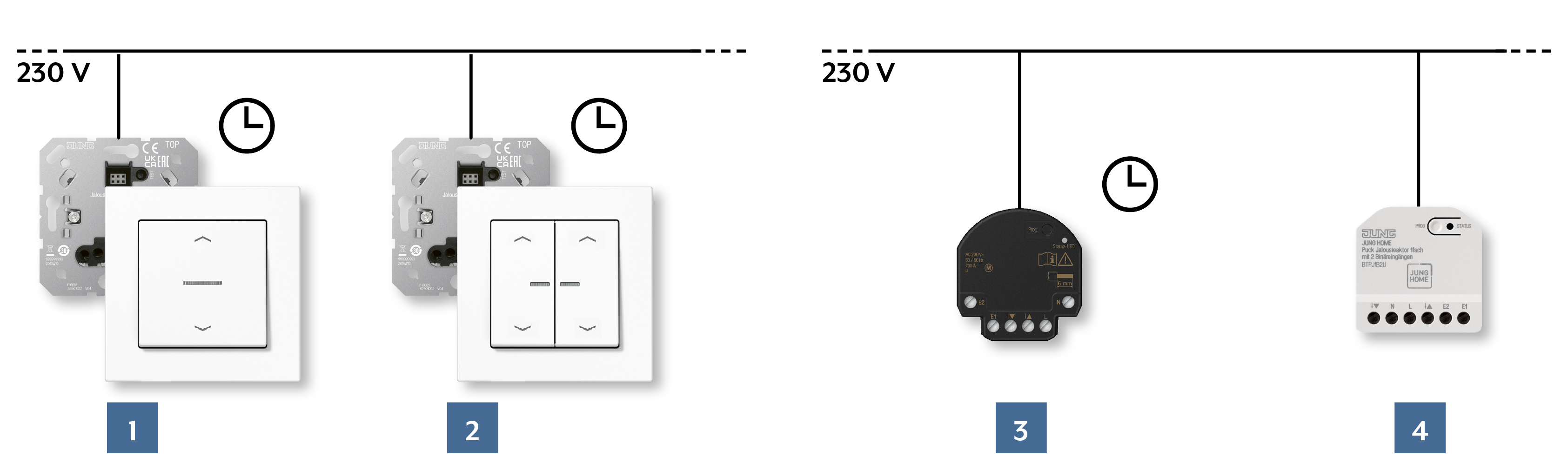
Control shading
  1. 1-gang push-button with arrow symbols
  2. 2-gang push-button with arrow symbols
  3. Blinds actuator 1-gang mini with 2 binary inputs
  4. 1-gang blinds actuator with 2 binary inputs
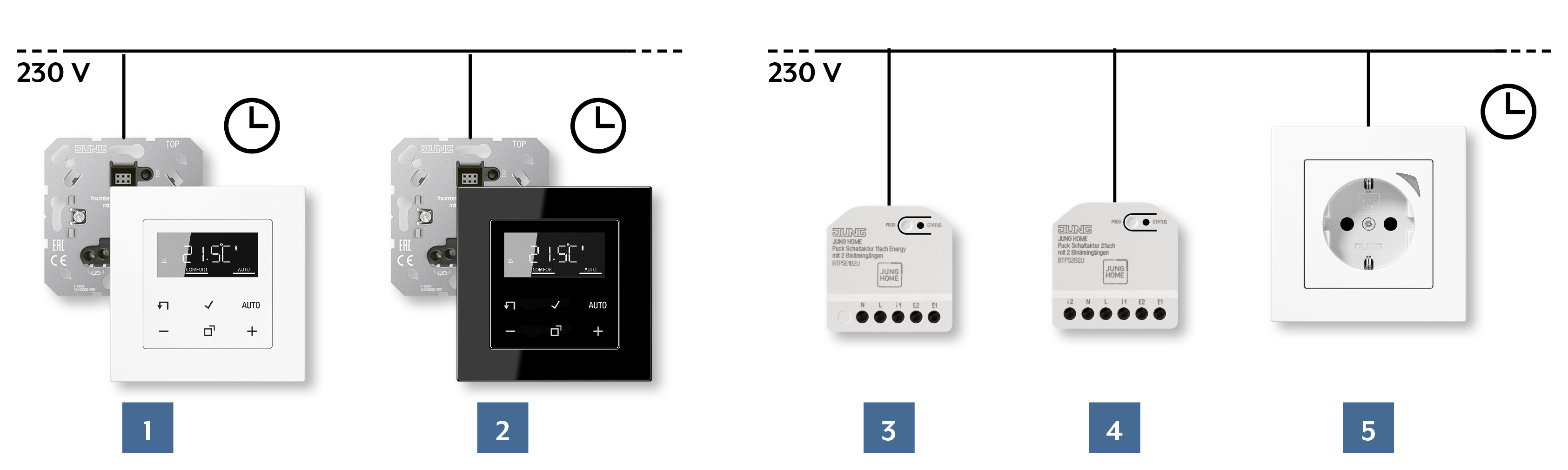
Control temperature
  1. Room thermostat display, white
  2. Room thermostat display, black

    For controlling the heating in combination with a room thermostat
  3. 1-gang Energy switch actuator with 2 binary inputs
  4. 2-gang switch actuator with 2 binary inputs
  5. SCHUKO® socket
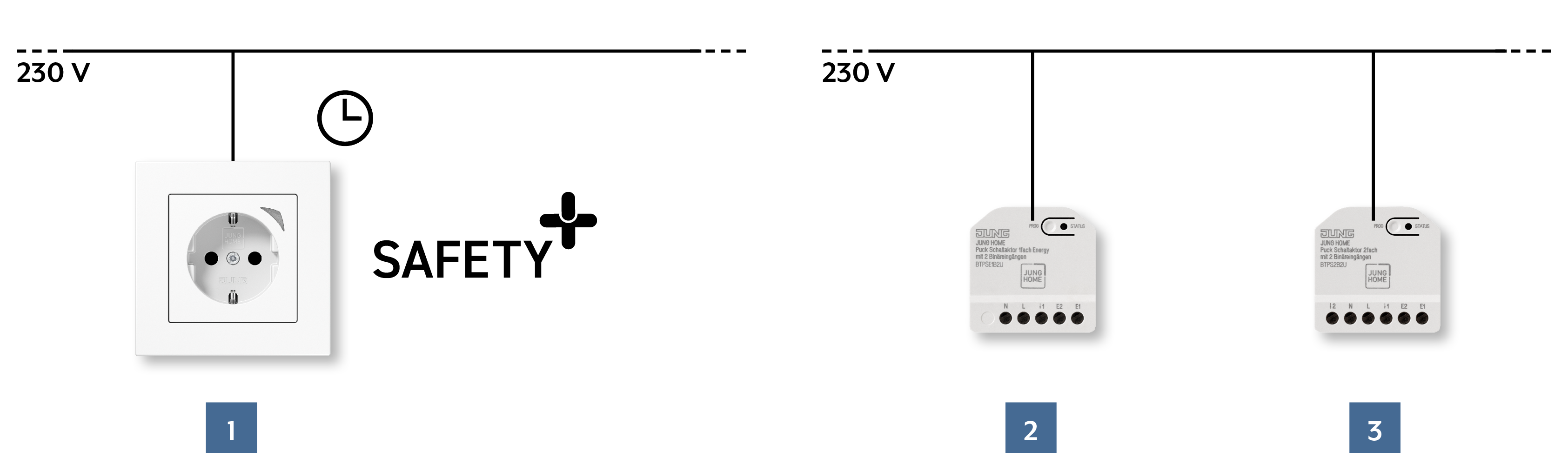
Switching electrical loads, optionally measuring energy consumption
  1. SCHUKO® socket Energy
  2. 1-gang Energy switch actuator with 2 binary inputs
  3. 2-gang switch actuator with 2 binary inputs
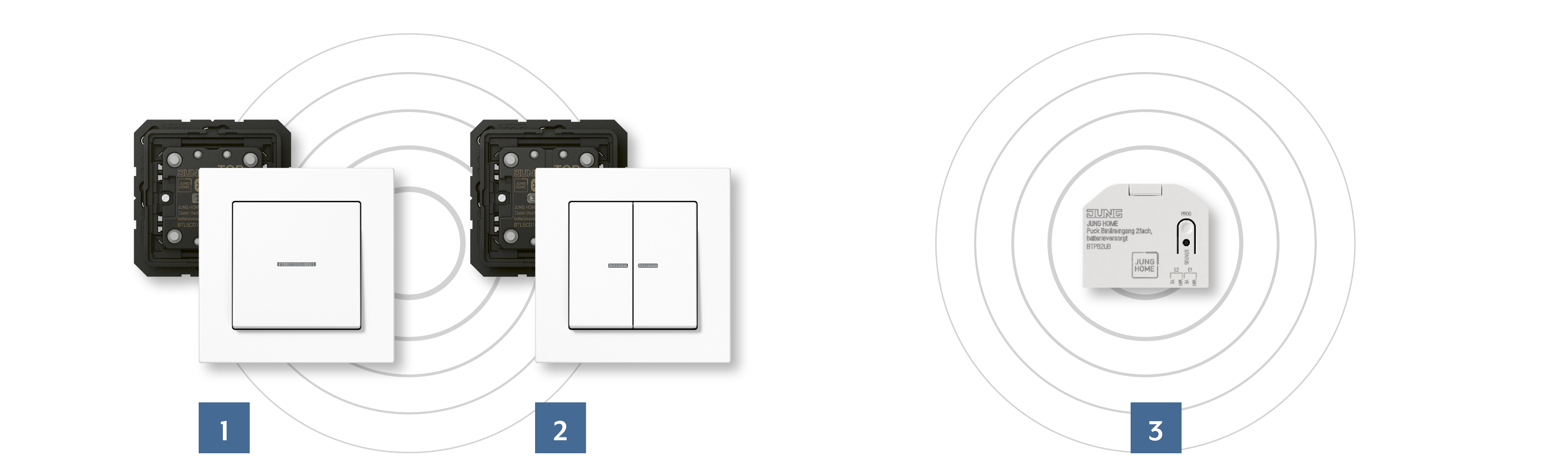
Wireless operation - battery-powered
  1. 1-gang rocker
  2. 2-gang rocker
  3. 2-gang binary input battery-powered

The smart sockets: switching devices energy efficiently

Smart JUNG HOME SCHUKO® sockets
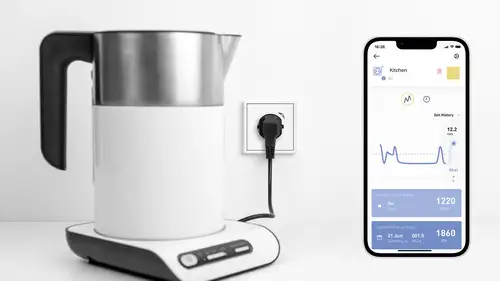
With the JUNG HOME SCHUKO® sockets, not only do you enjoy convenience and safety when charging devices, your energy consumption is reduced as well. They can be switched via JUNG HOME push-buttons, the app, or on the socket itself. Furthermore, devices in standby mode can be switched off without any complications.
JUNG HOME SCHUKO® socket Energy
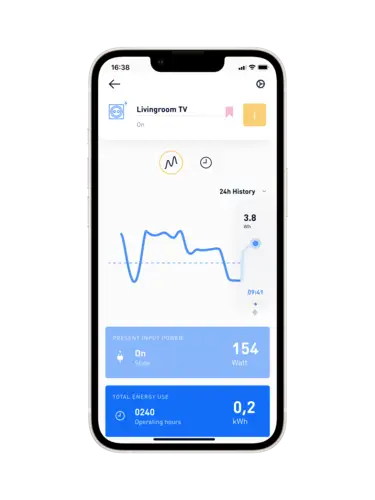
This smart version of the JUNG HOME SCHUKO® socket measures your electricity consumption, allowing for targeted energy management. You can view the clearly displayed energy consumption data via the app.

The smart push-button: control and dim lighting

JUNG HOME push-buttons
Light, shade, temperature: with JUNG HOME, you can control these functions simply with smart push-buttons. These are available in the LS, A, and CD design ranges; in LS 990, they are also available in the Les Couleurs® Le Corbusier colours, integrating harmoniously into every interior.
JUNG HOME battery operated push-buttons
In this version, these smart push-buttons can be placed in positions where no cables are present or can be laid, completely independent of the 230-volt installation.

Controlling the temperature

Using either push-buttons, the app, or voice control: with JUNG HOME, you can control the temperature in your home however you want, matching your needs in an energy efficient manner. 
The JUNG HOME temperature control at a glance:
  • Enables the control of the room's temperature using voice control, the app and push-buttons.
  • Ability to be integrated into pre-set scenes. For example, with a push-button at the front door, you are able to set the heating to be in ECO mode and switch off every light when leaving the home.
  • Grants fast access to all room thermostats using the app.
JUNG HOME app

Overview and monitoring: using the JUNG HOME app, users decide on the temperature in their smart home. Thanks to Bluetooth® SIG mesh, the app enables control of the temperature in the whole building and, with the help of the gateway, even remotely.

For full control at any time; using the app to control the JUNG HOME system networked by Bluetooth® SIG mesh , users can easily set the temperature in the whole building. With the help of the Gateway, the range of control is extended further.

JUNG HOME room thermostat display
The room thermostat is able to detect a fall in temperature and switch the heating to frost protection mode. It is also possible to link the temperature control with other functions to create a scene.

Smart switching with motion detection

Light switched on only when needed, pleasant temperatures only when present: With motion and presence detectors, JUNG HOME creates the ideal atmosphere while being energy efficient. 
The motion and presence detectors have a particularly large detection range of180 degrees and 360 degrees respectively. Shut-off delays that are individually configured help disconnect electrical loads after a period of not detecting any motion, saving energy while ensuring that the atmosphere is to your comfort when you are present.
JUNG HOME motion detector 1.10 m
The 1.10 m motion detector is ideal for installation in hallways. Two PIR sensors monitor for motion with a detection range of 180 degrees. These can be used individually or together.
JUNG HOME motion detector 2.20 m
This version for mounting at 2.20 m height is suitable for common areas or offices. Its settings can be conveniently configured with the JUNG HOME app.
JUNG HOME presence detector
The smart presence detector on the ceiling reliably detects movements within a 360-degree detection range of up to 20 metres. The three PIR sensors of the JUNG HOME presence detector can be configured and activated independently of each other.

JUNG HOME Pucks and actuators

These small actuators give you even more possibilities. For example, in this way, conventional weather sensors can be used as a wind alarm and for rain detection using the two binary inputs on the switch actuator. The JUNG HOME actuators can be controlled by JUNG HOME push-buttons and the JUNG HOME app via the binary inputs and enable the wireless connection of various devices to the system. They also feature Bluetooth® Mesh for fully encrypted communication. Furthermore, they have a repeater function and can be updated using the JUNG HOME app.
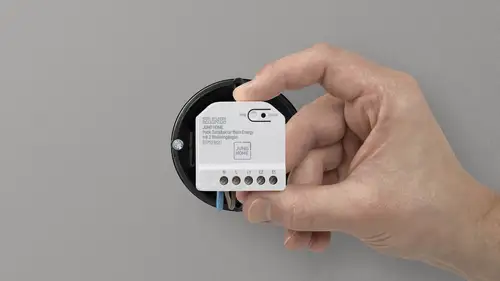
JUNG HOME Pucks
JUNG HOME Pucks make apartments and houses smart – really easily and with no expensive installation work. Light, shading or temperature control: the compact Pucks bring numerous intelligent functions to existing electrical installations. The beginning of a Smart Home can be implemented with individual applications and extended as needed step by step.
Actuators with additional time programs
Blinds actuator
Manual and automatic control of blinds, shutters or awnings. Awning-specific functions such as ventilation setting, running time and inverse operation, among others, can be set individually.
Switching actuator
Manual and automatic switching of lighting and household devices. Has a staircase lighting function (automatic switching off) with switch-off warning, run-on time, and switch-on and switch-off delay.

At the heart: the JUNG HOME app

Operate the smart home, set up scenes or install updates: you only need one app.
The JUNG HOME app offers you direct access to all devices without the use of the Internet, WLAN router or a server. Navigating the app is simple with clear and intuitive design. Your integrator installs and configures the system however you desire, which can then be easily extended and changed by yourself with the JUNG HOME app at any time. Cloud services such as Amazon Alexa and Google Home can also be connected with the app with the help of the JUNG HOME gateway.
Your advantages with the JUNG HOME app at a glance:
  • Enables commissioning, configuration and operation of all JUNG HOME devices.
  • Simple linking of transmitters and receivers.
  • Easily set up scenes.
  • Updates all JUNG HOME devices when there are new releases and functions.
  • Fully encrypted with wireless Bluetooth® SIG mesh communication.
Quick access to favourites
Dimming lighting precisely
Selectively set blinds
Control the temperature manually

JUNG HOME Gateway

With the JUNG HOME gateway, you connect the system with the Internet. In this way, you can integrate many functions and services from different providers into your networked home. Three separate LEDs (network, Bluetooth® and cloud) help with setup with clear status indication. The gateway is suited to wall installation or as a desktop device.

JUNG HOME in virtual reality

We have built a virtual 3D house and equipped it from cellar to roof with JUNG HOME. You can find out about this house in virtual reality, including ground plans and concrete installation tips.

Securely networked in the switch design

Illustration of Bluetooth® Mesh.

JUNG HOME devices are networked using Bluetooth® SIG mesh. Due to the automatic encryption, the worldwide standard makes the wireless data transmission particularly secure.
Bluetooth® SIG mesh technology makes setting up a decentralised, wireless network possible
JUNG HOME devices are both transmitters and receivers at the same time. They communicate with each other using a high level of encryption, AES-128. Commands transmitted move over the mesh network from device to device until they reach their target. This allows communication that goes significantly beyond the direct wireless range. Bluetooth® SIG mesh works completely without the Internet or a server, and the data remain in-house.
JUNG HOME is scalable
Function for function. Room for room. Floor for floor: in this way, small to large applications can be implemented. Not requiring Internet access, every device is linked and configured with a smartphone and the JUNG HOME app. Once the system has been set up, you can simply transfer the project to family members to share access.
System limits
  • Up to 60 devices (1 device = cover + insert) can be linked in one system. These can be configured and operated with one end device.
  • The project synchronisation is used for simple configuration and operation with multiple end devices with systems of up to 20 devices. With more than 20 devices and multiple end devices, a Smart Visu Server is a requirement for operation.

  • With more than 20 devices of the same device type (e.g. 20 blinds actuators), a Smart Visu Server is a requirement.
  • For systems with more than 20 devices, of which at least 50 % of the devices are to be configured with automations, a Smart Visu Server must be used. The server runs the central time control.
JUNG HOME push-button in the LS 990 programme and JUNG HOME logo next to rolled-up construction plans

JUNG HOME Workbook

Implement numerous applications with only a few devices: in this Workbook, you will find all the details on functions, application examples, combination possibilities and helpful tips for fast commissioning of your projects. Structured. Clear. Understandable.
The digital infrastructure for the home
With the easily installed JUNG HOME system, you get intelligent technology into the home quickly and without complication. Whether it is for your apartment or for a whole building: extendable on a modular basis, room for room, floor for floor.
Applications
Energy efficiency and energy management, convenience functions and security solutions: configure in JUNG HOME, control and regulate everything conveniently with the JUNG HOME app, push-buttons or voice control.
Solutions
Switch and dim lights, manually or automatically, as well as controlling and regulating shading and temperature: the functions can be configured individually or in combination with multiple devices.
Mounting and installation
With the selection of the JUNG HOME covers and system inserts, you decide which functions you want to install in your smart home. Can be extended at any time with additional devices. In this way, your installation stays flexible in the future as well.
The JUNG HOME app
The JUNG HOME app on your smartphone is the heart of your complete system. Commissioning, configuration and operation of the JUNG HOME devices is undertaken centrally via the JUNG HOME app.
JUNG HOME Workbook
The JUNG HOME Workbook provides an overview of the functions of the system. All covers and system inserts, concrete application examples and solutions and the functions of the JUNG HOME app.

Updates

JUNG HOME Logo
JUNG HOME app version 2.0
The following new functions are available:
  1. Support for the seven new JUNG HOME Pucks:
    The budget-conscious JUNG HOME Pucks switch electrical loads and dimmer lighting, move shading and always have per two binary inputs for simple operation. The particularly compact design enables simple and inconspicuous installation in flush-mounted boxes, false ceilings, shutter boxes or luminaire canopies.
  2. Project synchronisation with admin / member mode:
    With project synchronisation, JUNG HOME projects can be synchronised with up to nine other users or mobile devices. All existing devices can be operated by the participants. An admin can also add devices and create and edit scenes, areas and automations. All changes to the project are automatically synchronised with all participants.
  3. New device software for all JUNG HOME products:
    Update from Bluetooth Mesh 1.0.1 to 1.1. Important: There is no update obligation for the JUNG HOME products in existing systems. Both channels of 2-channel JUNG HOME products support automatic functions and scenes after the update. From week 51/2025 (15 December), the JUNG HOME app 2.0 will be available as announced in the Android and iOS stores.
JUNG HOME Logo
JUNG HOME Release 1.4.0 
The following new functions are available:
Various optimizations and improvements: 
  • Automatics (timer programs) trigger again reliably 

If automatic app updates are activated in the iOS App Store settings or in the Android Playstore, the JUNG HOME app update takes place automatically. After restarting the app, the release notes are displayed directly in the app. Existing device updates are displayed under "Settings" -> "Updates", which should be carried out. Each device update only takes about 2 to 3 minutes. 


At this point we would like to present again the informative JUNG HOME workbook, which is available online in four languages:
JUNG HOME Logo
App v1.3.1 for nd Android (368967) was released for the JUNG HOME system.
This version contains new functions and supports the JUNG HOME Gateway

JUNG HOME App Version 1.3.1
Optimizations and improvements:
  • Improved loading times (Note: The first opening after updating to version 1.3.1 requires longer loading times. From the second opening onwards, the loading times are shorter.)
  • Devices can be operated after a project import

JUNG HOME Gateway Version 1.3.1 
Optimizations and improvements:
  • Improved performance in communication between the Bluetooth mesh network and the gateway.
  • Frequent gateway restarts in larger systems have been eliminated.
Note: The gateway is updated automatically, regardless of the end device used.
Various optimizations and improvements: 
  • Automatics (timer programs) trigger again reliably 

If automatic app updates are activated in the iOS App Store settings or in the Android Playstore, the JUNG HOME app update takes place automatically. After restarting the app, the release notes are displayed directly in the app. Existing device updates are displayed under "Settings" -> "Updates", which should be carried out. Each device update only takes about 2 to 3 minutes. 


At this point we would like to present again the informative JUNG HOME workbook, which is available online in four languages:

Discover the Live Services from JUNG

JUNG GRAPHIC TOOL
Create individually switches, sockets, KNX buttons, room controllers and more according to your ideas. The operating elements can be customised online with symbols, text or logos.
JUNG Showrooms
Experience our products and building technology in our showrooms near you.

JUNG Newsletter

Product news, architecture references and smart home trends: With our JUNG newsletters you are always well informed when it comes to trends and news.

Contacts

Do you have any questions, requests, or suggestions about our products and solutions? Please contact us. We hope we can help you!