
Smart Visu Server – ideal for smart homes
The Smart Visu Server makes intelligent building control convenient. With a user-friendly operating concept, you can control both the KNX system and other systems such as Philips Hue or Sonos on your mobile devices. Voice control through Amazon Alexa or Google Assistant can also be connected and utilised alongside your KNX system with the Smart Visu Server.
✓ Ideal for a detached house & upmarket apartments
✓ Easy to use
✓ Unlimited remote access with SV Remote
✓ Supports KNX Secure
✓ High-quality housing in anodized aluminium
✓ Ideal as a desktop device or with a mounting set for DIN rails and wall installation
✓ Voice control with Amazon Alexa or Google Assistant
✓ Compatible with SmartThings
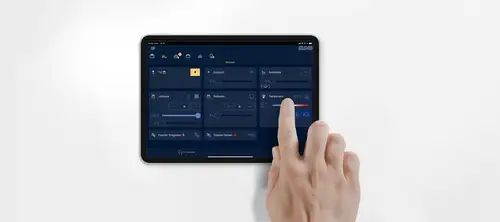
The compact control centre for your smart home
Compact yet powerful. The Smart Visu Server is the control centre for the smart home, allowing you to control lighting, blinds, heating and room climate, sun protection, ventilation, music, IP cameras and much more in a clearly structured user interface. Using individually created scenes, you can design processes in your smart home exactly as you need them.


Controlling your smart home: you have several options
With the Smart Visu Server, you can control your smart home in various ways: classically with push-buttons, intuitively with voice control or via the mobile app. Select the method that suits you best.


Enjoy your night after work with smart functions
Live conveniently with intelligent building technology - the Smart Visu Server shows its strengths when it involves daily routines and applications that can be tedious, allowing you to enjoy your night after work.
One app, many functions
The Smart Visu Server app shows all functions and states in the smart home in a clear and structured manner. It doesn't matter whether it is a smartphone, tablet, laptop or with a touch display from the Smart Control range - the control interface is always identical and adapts to the corresponding screen sizes.


The Smart Visu Server app can be found for both iOS and Android in the Apple App Store and in the Google Play Store respectively.


Smart sound with sonoro

The latest generation of sonoro music systems brings clear sound to every smart home and blends into the home in style as a design system.
The sonoro audio systems in the category "Smart Home" (e.g. MEISTERSTÜCK (Gen. 2), MAESTRO Quantum, AVATON, sonoro AMPLIFIER and sonoro STREAMER) can be integrated into the JUNG KNX system via the Smart Visu Server. The two systems can thus be controlled via the user interface of the Smart Visu Server via smartphone, tablet, Smart Control 8 display and LS TOUCH as well as KNX push-buttons. Various functions for music control can be used via KNX and integrated into scenes. This includes the selection of the music source, such as CD, radio or streaming services. The sonoro connection creates an solution for integrating multimedia into the smart home!

Smart Visu Server + JUNG HOME

With the connection to JUNG HOME, existing or new KNX installations can be expanded. For example, switched JUNG HOME sockets integrate table lamps into scenes and the Energy socket version displays the power transparently. If the existing KNX installation is extended, e.g. by the integration of the garage, the battery-powered push-button as a control unit or the mini actuators are an ideal addition. Even in areas where the frequency of KNX RF (886 MHz) is not permitted, JUNG HOME offers an interesting alternative via Bluetooth® Mesh. All functions are controlled via the visualisation of the Smart Visu Server.
More possibilities with the Smart Visu Server
Smart living with JUNG
For architects and property owners throughout the world, a KNX smart home from JUNG is the first choice when it involves the future-proof, intelligent control of building technology. Take a look at our reference projects.


Product data & updates

The Smart Visu Server visualises and controls KNX building technology and networks it with the smart systems from Sonos and Philips Hue. In this way, different functions can be run at the same time based on events or time. The connection of the Smart Visu Server to the KNX system is via the KNX IP router or the KNX IP interface. The connection to the Philips Hue system is established using the Philips Hue Bridge, and the connection to the Sonos system is via the local network. Retrospective integration into an existing KNX system can be easily accomplished.
Short description:
- Web visualisation of the KNX system for status display and operation (SV Home)
- Recommended simultaneous access of max. 10 different clients
- Integrated, web-based commissioning tool (SV Control)
- Simple creation of a pre-configured user interface, optimised for applications for homes and small commercial properties
- Graphical control elements and symbols can be selected from the supplied libraries to customise the control interface
- Import of the group addresses (three-level) using OPC import (ETS3, ETS4, ETS5)
- Manual input of group addresses possible
- NEW: remote maintenance of standard/universal in combination with IPS Remote
Administration:
Customised configuration can be done by the end user with access protection using roles and rights
Maintenance:
Software updates are made available online in the administration interface SV Control. Experienced owners can run these independently. If there is no Internet connection, an update can also be carried out offline using a USB stick. Since Version 1.2.1705, remote maintenance by a specialist electrical company is also possible using IPS Remote .
Communication standard:
KNX, IP, encrypted in the local network
Communication media:
TP, Ethernet RJ45 CAT 5, wireless, USB 2.0
Building functions:
- Lighting (switching, dimming, Tunable White, RGBW)
- Blinds (blinds, shutters, awnings, ventilation flaps, skylights, motors),
- Safety (leakage, condensation, storm/rain, CO2),
- Heating, ventilation, room climate (underfloor heating, radiator thermostat, ventilation, boiler)
- Scenes (> 100 scenes, using push-button or push-button sensor, app, voice control)
- Energy (energy measurement)
- Weather (weather forecast, weather station)
- Window and door monitoring (window/door contacts, lock bolt contacts)
- Coupling IoT devices (Philips Hue, Sonos, Alexa, Google Assistant)
Additional functions:
Value display, timer switch, limit value function, user management, presence simulation, logic functions, integration of other building technology systems (IoT), browser integration, multimedia, messaging, e-mail notifications, IP camera within the local network, webcam
Actions:
manages 25 action groups and 250 configurable actions:
- user-defined
- bound to switching times
- event-driven
- sun and moon-dependent (astro)
Versatile user interfaces
Alongside the standard view, the Smart Visu Server has three different themes. With these versions of the user interface, users have more choice – matching to the respective interior.


Easily change your settings
All the interfaces can be easily adapted via the settings in the Smart Visu Server. The app on a smartphone, tablet or touch display automatically applies the theme set in each case.

As soon as a new version is ready, the update will be available for download in the SV Control area. Alternatively, the update can be carried out as a USB update. You can find all changes in the "change log" document. This is available for download as a PDF file here.
Note: after the software update, we recommend that you delete the browser cache for all client devices (Smart Control, smartphone, etc.).
Faster commissioning using SV Control

The newest update for the Smart Visu Server version 1.2.1805 brings improvements and additions that increase the performance and user-friendliness.
One of the most important innovations is the introduction of a completely redesigned SV Control commissioning interface. The interface is based visually on the SV Home interface to ensure a consistent and seamless user experience.


Logic module for the Smart Visu Server
The Smart Visu Server is extended with a graphical logic editor. Automations can be
created easily, with logic blocks linked directly in the interface via drag-and-drop. This
reduces effort, simplifies processes and allows flexible expansion of functions.
Installation and configuration
Configure your KNX smart home quickly and easily
Install the Smart Visu Server with the SV Control commissioning tool.
Step 1: Installation
Starting with ETS Import
The Smart Visu Server is integrated into the home network using the KNX IP router or the KNX IP interface. With the integrated commissioning tool SV Control, the visualisation of the KNX installation is then built-up step by step in the user interface. SV Control works independently of the operating system. Import the existing KNX installations with an OPC file directly from the ETS. During installation, the Smart Visu Home user interface is automatically generated from the configuration in the SV Control commissioning tool. Access is via a browser.
Step 2: Configuration
Specify functions & actions
With the range of imported KNX devices, you now configure different areas and devices. Afterwards, specify the functions, such as switching on the LED colour light in the standard luminaire in the living room. Combining different functions is done in the actions to create scenes. Up to 16 functions can be allocated to an action. From "Welcome" to "Switch off all centrally", you set up every imaginable switching operation in the smart home.
Step 3: Handover
The password protection protects against unwanted changes
Once everything is configured, the controls of the settings can be handed over to the customer. Jointly define the parts of the control area of the Smart Visu Server that your customer can or would like to edit. Provide all others with a password. This allows the customer to make changes themselves without requiring your assistance. In addition, inexperienced smart home users will not be able to make changes for parts they should not edit if they do not have the password.
Step 4: Install updates
System maintenance is made easy. When a new version is ready with additional features and improvements, the update will be available in the SV Control area. Depending on the agreement, your customers can install the updates themselves or with your assistance. You can find all patches for the Smart Visu Server in the "Change Log" document. This is also available for download as a PDF file.
Control Philips Hue with the Smart Visu Server
By integrating the Philips Hue LED coloured light system, you can create individual light scenes, colour moods, switch-on brightness in your home.
Music in the house with the Sonos sound system
Always the perfect music: using the connection to the Sonos sound system, you can hear your favourite music everywhere.
Sound in the office with the Sonos sound system
At work, you can experience optimum sound in all the rooms, selecting volume, playlists and songs all in one app.
Control Smart Visu Home with voice control
Connect an existing KNX installation with the help of the Smart Visu Server to an Amazon Echo or Amazon Echo Dot.
Quick Start Guides
Funktionen einrichten und direkt nutzen: Die Quick Start Guides zeigen anhand kurzer und verständlicher Schritt-für-Schritt-Anleitungen, wie Sie die vielseitigen Möglichkeiten des JUNG Smart Visu Servers ausschöpfen.


KNX building technology from JUNG
From easy to use push-buttons to complex system components, JUNG KNX components provide reliable solutions for control, visualisation and organisation of the building technology.


More information


Discover the Live Services from JUNG


JUNG Newsletter
Product news, architecture references and smart home trends: With our JUNG newsletters you are always well informed when it comes to trends and news.